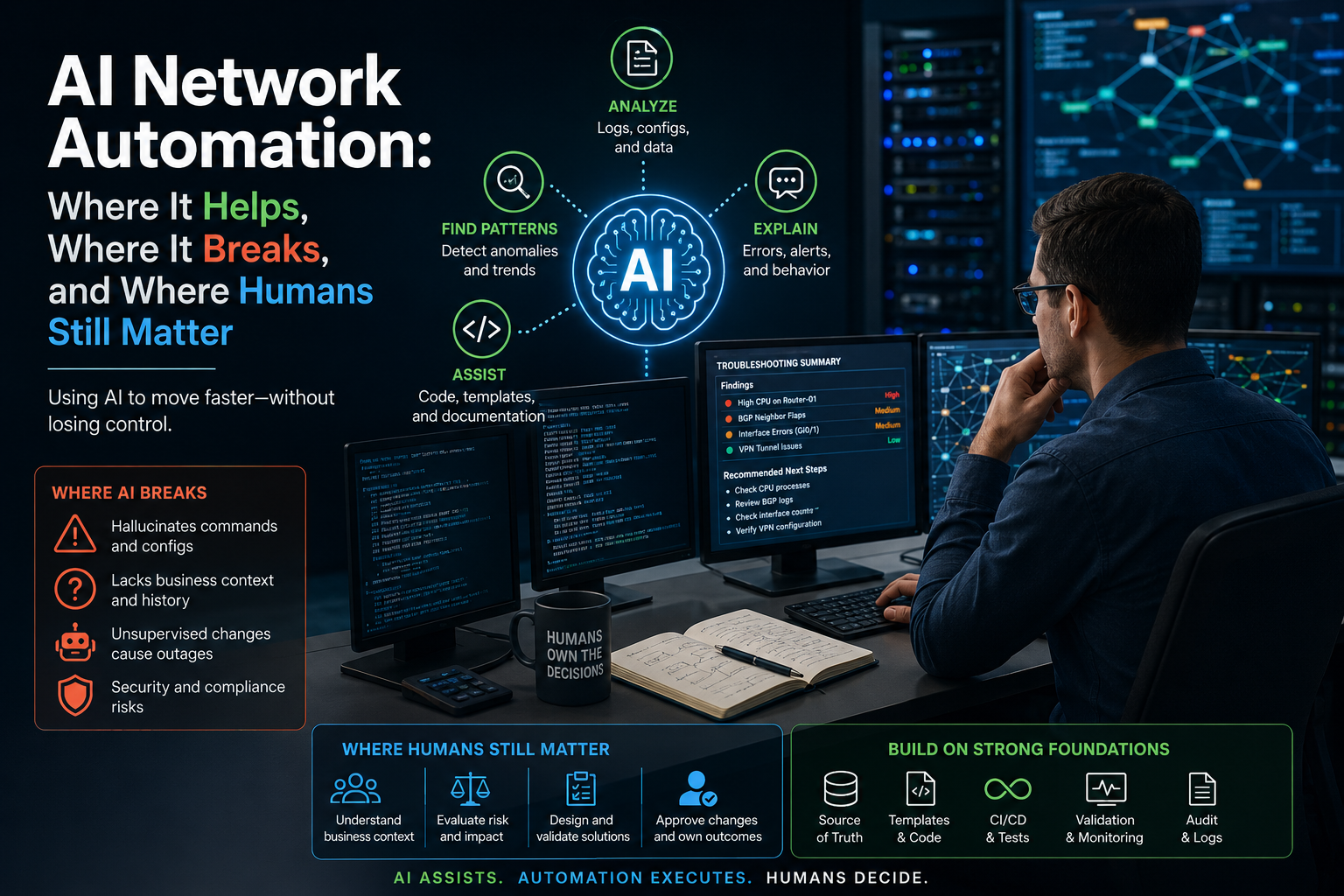
Artificial intelligence (AI) is moving quickly into every part of information technology (IT) operations. It is writing code, summarizing tickets, parsing logs, explaining error messages, and helping engineers move faster through work that used to take hours. For network engineers, this creates both excitement and a very healthy amount of skepticism.
That skepticism is not because network engineers are against automation. In fact, networking has been moving toward automation for years. We have used Python, Ansible, Terraform, Netmiko, NAPALM, pyATS, application programming interfaces (APIs), Git, continuous integration/continuous deployment (CI/CD) pipelines, templates, and source-of-truth platforms like NetBox and Nautobot. The industry has already accepted that manual command line interface (CLI) work does not scale forever.
The real concern is different.
Network engineers are not afraid of automation. They are afraid of non-deterministic automation making changes to production infrastructure.
That distinction matters.
There is a big difference between using AI to help read logs and letting an AI agent make live configuration changes. There is a big difference between asking AI to explain a packet capture and allowing it to modify firewall rules. There is a big difference between using AI to draft an Ansible playbook and letting it decide the business logic behind a routing change.
One is assistance. The other is control.
And in network operations (NetOps), control matters.
A bad email can be rewritten. A bad report can be corrected. A bad slide can be fixed before the meeting. But a bad network change can take down applications, break customer access, interrupt business operations, create security exposure, or trigger an incident bridge that nobody wanted to join.
So the question is not, “Should we use AI in network automation?”
We should.
The better question is, “Where does AI actually help, where does it break, and where do humans still need to stay in the loop?”
That is what we need to get right.
What Is the Practical Reality of AI in Network Operations?
There is a lot of hype around AI agents right now. The story usually sounds something like this: you ask an AI agent to troubleshoot a problem, it gathers data, finds the root cause, applies the fix, validates the result, and writes the incident report.
That sounds great in a demo.
In a real production network, it is not that simple.
Networks are full of context. A route might exist because of a migration that happened three years ago. A firewall rule might look too broad, but it may support a legacy application that has not been modernized yet. A Border Gateway Protocol (BGP) policy might look redundant until a failover event happens. A virtual local area network (VLAN) might look unused until the one day a month a batch process runs through it.
AI can analyze configuration and operational data, but it does not automatically understand the history, politics, exceptions, business requirements, and operational scars behind that data.
That is why the safest place to start with AI in network operations is not change execution. It is analysis.
Use AI to help engineers understand what is happening faster. Let it summarize logs, compare pre-checks and post-checks, explain vendor errors, classify tickets, and generate first drafts of scripts or documentation. Those are high-value tasks where AI can save time without becoming the system of authority.
The deeper lesson is this: AI should support the network automation lifecycle, not replace the controls that make network automation safe.
How Does AI Help with Reading Large Amounts of Network Data?
One of the best uses for AI in network operations is also one of the least glamorous: reading large amounts of text.
Network devices produce a lot of output. Logs, debug messages, show commands, controller events, syslog streams, virtual private network (VPN) errors, firewall denies, routing tables, interface counters, wireless client events, cloud networking logs — it adds up fast.
During an outage or troubleshooting session, an engineer may have to comb through thousands of lines of output looking for the few lines that actually matter. AI is very useful here because it can quickly summarize large text blocks and surface patterns that might otherwise take longer to find.
For example, instead of manually reading an entire show tech-support, you can provide sanitized output and ask AI to identify anomalies, group findings by severity, and point to the supporting evidence. The key is to keep the task bounded.
A good prompt might look like this:
Review this network device output.

Identify anything that looks abnormal.
Group findings by severity.
Include the exact lines that support each finding.
Suggest the next show commands I should run to validate the issue.

Do not recommend configuration changes.
Do not invent missing data.
Do not assume the root cause without evidence.
That last part is important.
AI is helpful when it acts like an analyst. It becomes risky when it starts acting like the engineer of record.
In this pattern, the AI is not logging into devices. It is not making decisions. It is not changing anything. It is helping a human read faster and think through the next step.
That is a very practical starting point.
How Can AI Help Explain Network Errors and Troubleshooting Clues?
Another strong use case is explanation.
Every network engineer has run into an error message that was technically correct but not immediately helpful. Maybe it was a BGP state transition, an IP Security (IPsec) negotiation failure, a certificate problem, an API error, a controller alarm, or a packet capture that needed a second set of eyes.
AI can help translate these clues into plain English.
You might ask it to explain why an IPsec tunnel is failing Phase 1, what a specific BGP notification means, or what a Transmission Control Protocol (TCP) reset pattern suggests in a packet capture. This can be especially useful when you are working across technologies that you know, but do not touch every day.
The important point is that AI should help you form better hypotheses. It should not jump straight to remediation.
A troubleshooting assistant should be asked to do things like:
Explain this error message.
List the most likely causes.
Separate reachability, authentication, policy, and configuration issues.
Recommend the next validation steps.
Do not suggest configuration changes yet.
That kind of workflow is safe because it keeps the engineer in control. AI helps organize the problem. The human validates the evidence.
This is where AI feels less like a replacement and more like a very fast rubber duck that has read a lot of documentation.
How Can AI Help with Ticket Triage and Workflow Routing?
Tickets are another place where AI can add value.
A lot of network tickets come in messy. The requester may not know whether the issue is Domain Name System (DNS), Dynamic Host Configuration Protocol (DHCP), VPN, firewall, wireless, routing, switching, proxy, or application-related. They may describe the symptom as “the network is slow,” but the real problem might be packet loss, a blocked port, an expired certificate, a DNS resolution issue, or an application dependency they did not mention.
AI can help extract useful structure from unstructured tickets.
For example, it can read a ticket and pull out the source IP, destination IP, application name, user impact, error message, business urgency, and missing information. It can also classify the ticket into a likely category and suggest which approved troubleshooting workflow should run next.
This pairs nicely with orchestration tools and IT service management (ITSM) systems. A ticket comes in, AI extracts the important details, a workflow runs a set of read-only checks, and the results are summarized for an engineer.
The safe version looks like this:
Ticket comes in
   ↓
AI extracts useful context
   ↓
Workflow selects from approved troubleshooting paths
   ↓
Read-only checks run
   ↓
AI summarizes the findings
   ↓
Engineer decides what happens next
The unsafe version looks like this:
Ticket comes in
   ↓
AI guesses the root cause
   ↓
AI logs into devices
   ↓
AI changes production
   ↓
Everyone hopes it was right
That second workflow might look exciting in a vendor demo, but it is not where most teams should start.
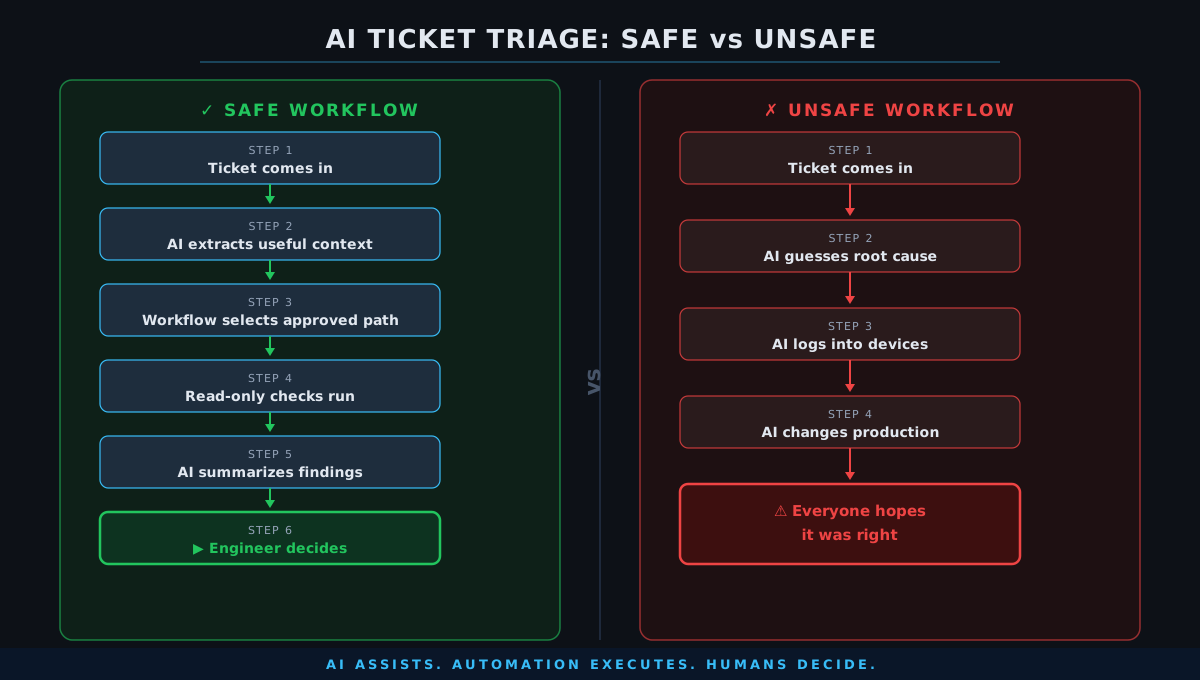
The better model is to let AI help route the work, not own the outcome.
How Does AI Help with Code, Templates, and Documentation?
AI is also excellent at removing the blank page.
This is useful for network engineers because so much of automation work starts with repetitive structure. You may need a Python script to call an API, an Ansible playbook to collect facts, a Jinja template to generate configuration, a Terraform module to define cloud networking resources, or a Markdown document to explain a workflow.
AI can help create that first draft quickly.
That does not mean the draft is production-ready. It usually is not. But it gives you something to review, test, and improve.
For example, you might ask AI to create a Python script that connects to a lab router using Netmiko and collects interface status. Or you might ask it to build a Jinja template for a standard BGP neighbor configuration. Or you might ask it to generate a pyATS test that validates BGP neighbors are established after a change.
This is a great use of AI as long as you understand what it created.
That is the catch.
AI-generated code can look clean while still being wrong. It can miss error handling. It can use the wrong vendor syntax. It can assume an API field exists when it does not. It can overwrite configuration when you expected a merge. It can store secrets poorly. It can skip pagination. It can forget rollback. It can loop through every device when you only meant to test one.
In network automation, “the code runs” is not the same as “the code is safe.”
So use AI to draft. Use your engineering knowledge to validate.
The rule I like is simple: do not run AI-generated automation against production if you cannot explain what every important part of it is doing.
Why Does AI Break When Network Automation Requires Determinism?
Network automation needs to be deterministic.
Given the same input, the system should produce the same output. Given the same approved template and source-of-truth data, the generated configuration should be predictable. Given the same test conditions, validation should be repeatable.
AI does not naturally behave that way.
Large language models (LLMs) are probabilistic. They generate likely responses based on context. That is useful for summarization, explanation, drafting, and pattern recognition. It is not ideal as the final authority for production configuration.
This is why AI should not replace templates, data models, Git, CI/CD, approval processes, or post-change validation. Those pieces are what give network automation its reliability.
A safe automation pipeline might look like this:
Source of Truth
   ↓
Approved Data Model
   ↓
Approved Template
   ↓
Generated Config
   ↓
Diff Review
   ↓
Validation
   ↓
Human Approval
   ↓
Deployment
   ↓
Post-Change Testing
AI can assist at many points in that pipeline. It can help write the first version of a template. It can summarize a diff. It can explain a failed validation test. It can generate a change description. It can compare pre-check and post-check results.
But the pipeline itself should remain deterministic.
That is the balance.
Let AI accelerate the engineering work. Do not let it become the source of truth.
How Do Hallucinated Commands and False Confidence Break AI in Network Operations?
One of the biggest risks with AI is that it can be confidently wrong.
It may generate a command that does not exist. It may mix Cisco syntax with Juniper syntax. It may recommend an outdated command. It may invent an API parameter. It may misunderstand the platform. It may suggest a fix that sounds reasonable but does not apply to your environment.
This is annoying when you are experimenting in a lab. It is dangerous when you are making changes in production.
The real issue is not just hallucination. It is hallucination plus confidence.
A human engineer might say, “I need to check the documentation.” AI may say, “Here is the fix,” even when the fix is wrong.
That confidence can trick people into moving too quickly.
This is why AI output should always be evidence-based. If AI identifies a problem, it should show the lines of output that support the finding. If it recommends a next step, it should explain why. If it is unsure, it should say so.
A better troubleshooting prompt should force that behavior:
For each finding, include:
- Severity
- Evidence from the provided output
- Why it matters
- What additional data is needed
- Confidence level
- Recommended next validation step
This does not make AI perfect, but it makes the output easier to review.
And review is the point.
Why Does AI Break Without Network Business Context?
A network configuration is not just a technical artifact. It is a record of business decisions, exceptions, migrations, acquisitions, outages, legacy dependencies, and sometimes things nobody wants to touch because they still work.
AI does not automatically know that context.
It might look at a firewall rule and say it is too broad. It might be right. But that does not mean the rule can be removed today.
It might look at a route and say it appears unused. It might be right. But that route may only matter during disaster recovery.
It might look at a VLAN and say nothing is connected. It might be right at that moment. But maybe that VLAN supports a monthly batch job, a backup process, or a seasonal business function.
This is where human judgment matters.
Network engineers understand that the right technical answer is not always the right operational answer. There may be application owners to contact, compliance requirements to consider, maintenance windows to schedule, rollback plans to prepare, and business impact to validate.
AI can analyze what is present. Humans still need to understand why it is present.
That is a major difference.
What Does a Safer AI Network Automation Architecture Look Like?
The safest architecture for AI in network automation is not “AI logs into the network and fixes things.”
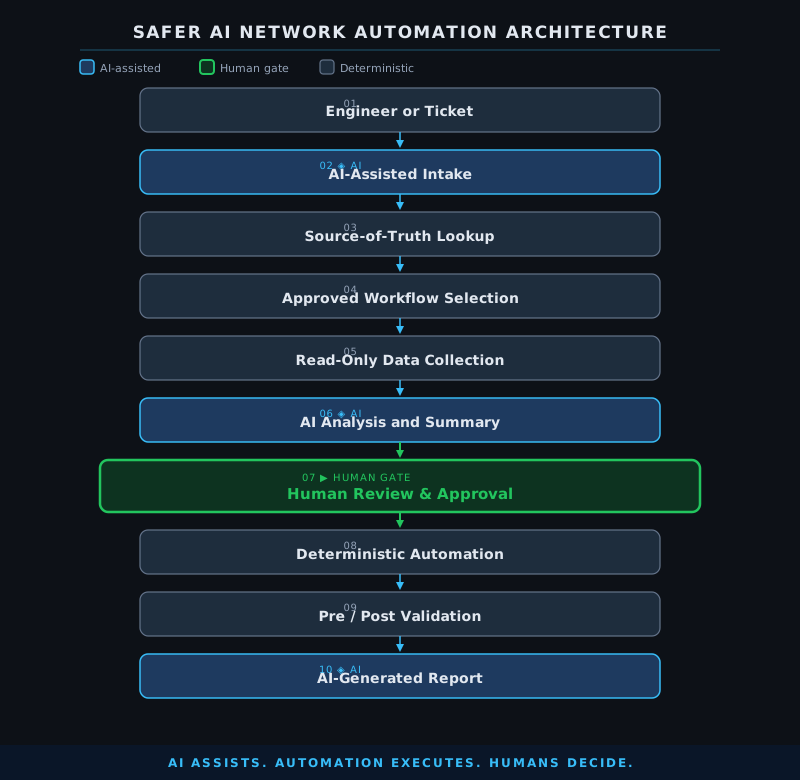
A safer architecture looks more like this:
Engineer or Ticket
   ↓
AI-Assisted Intake
   ↓
Source-of-Truth Lookup
   ↓
Approved Workflow Selection
   ↓
Read-Only Data Collection
   ↓
AI Analysis and Summary
   ↓
Human Review
   ↓
Deterministic Automation
   ↓
Pre/Post Validation
   ↓
AI-Generated Report
In this model, AI is involved, but it is not uncontrolled. It helps interpret data, summarize findings, and prepare recommendations. The actual change path still depends on approved workflows, source-of-truth data, validation, and human approval.
This is how AI becomes useful without becoming reckless.
The best part is that teams can adopt this gradually. You do not need to jump straight into autonomous remediation. Start with read-only workflows. Build trust. Add structure. Add validation. Add approvals. Then expand carefully.
That approach may not be as flashy as a fully autonomous AI agent, but it is much more realistic for production NetOps.
Why Should You Start with Read-Only AI Workflows?
The first AI project I would recommend for most network teams is a read-only troubleshooting assistant.
Keep it simple.
Have an engineer select a device. Run a set of approved show commands. Sanitize the output. Send the output to AI for summarization. Ask the AI to identify anomalies, provide supporting evidence, and suggest the next validation steps. Then let the engineer decide what happens next.
That workflow could look like this:
Engineer selects device
   ↓
Automation collects show commands
   ↓
Output is sanitized
   ↓
AI summarizes potential issues
   ↓
AI suggests next validation steps
   ↓
Engineer reviews and decides
This type of workflow is valuable because it solves a real problem without introducing unnecessary risk.
It helps engineers move faster during troubleshooting. It creates better summaries. It can improve handoffs. It can help junior engineers learn. It can create cleaner incident notes. And because it is read-only, the blast radius is controlled.
Once that works, you can expand.
Add ticket parsing. Add NetBox lookups. Add pre-check and post-check comparisons. Add change summary generation. Add config diff analysis. Add compliance checks against standards. Add AI-assisted documentation.
Each step adds value without handing full control to the model.
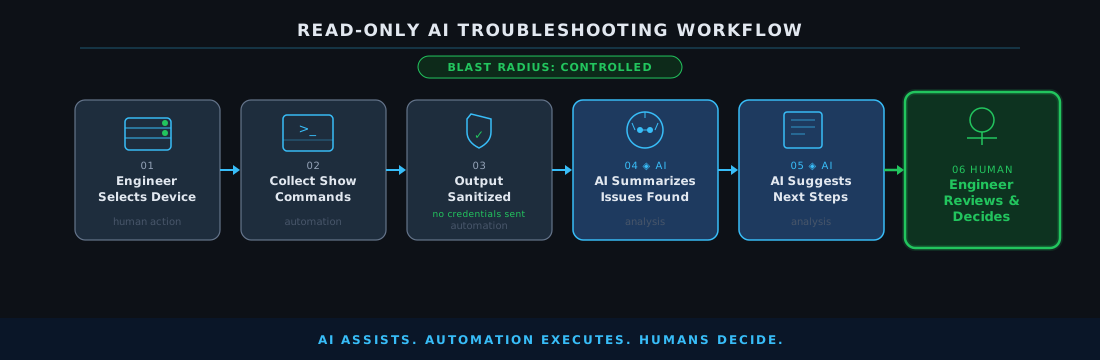
That is how teams should mature into AI-assisted operations.
Why Is Human-in-the-Loop Not a Temporary Phase?
A lot of people talk about human-in-the-loop as if it is just a temporary stage until AI becomes good enough to remove the human.
I do not see it that way for network operations.
Human-in-the-loop is not just about correcting weak AI output. It is about accountability.
When a production change happens, someone owns that change. Someone understands why it was needed. Someone approves the risk. Someone knows how to validate it. Someone can explain it during an incident review. Someone can make the judgment call when the data is incomplete.
That responsibility does not disappear because AI produced a confident recommendation.
Maybe over time we allow more autonomy for very narrow, low-risk, highly tested use cases. For example, AI might recommend a known remediation, and deterministic automation might execute it automatically when the blast radius is small and rollback is proven.
But broad autonomy across production networks is a different thing.
Before we get there, we need strong controls:
- Read-only access by default
- Role-based permissions
- Approved runbooks
- Source-of-truth validation
- Git-based review
- CI/CD testing
- Pre-checks and post-checks
- Audit logs
- Human approval for meaningful changes
- Clear rollback plans
That is not slowing AI down. That is making AI operationally usable.
What Should Network Engineers Learn to Work Effectively with AI?
AI does not remove the need to learn network automation fundamentals. It makes those fundamentals more important.
If you understand Python, APIs, JavaScript Object Notation (JSON), YAML Ain’t Markup Language (YAML), Git, Jinja, Ansible, Terraform, NetBox, and pyATS, AI becomes a serious accelerator. You can ask better questions, validate the answers, spot bad assumptions, and turn rough drafts into working systems.
If you do not understand those foundations, AI can make you dangerously fast.
That is the part people need to take seriously. AI lowers the barrier to creating code and automation, but it does not automatically give someone the judgment to run that automation safely.
A good learning path still looks very familiar:
Start with Linux and shell basics. Learn Python. Learn how APIs work. Get comfortable with JSON and YAML. Use Git. Learn Jinja templating. Build simple Ansible playbooks. Understand Terraform if you are working with cloud or infrastructure as code. Use NetBox or Nautobot as a source of truth. Learn how pyATS or similar tools can validate operational state.
Then bring AI into that workflow.
Use it to explain concepts, generate examples, review your code, summarize outputs, and help you move faster. But do not use it as a crutch to skip the learning.
The engineers who benefit most from AI will not be the ones who blindly trust it. They will be the ones who know enough to challenge it.
What Is the Real Role of AI in Network Automation?
The role of AI in network automation is not to replace deterministic systems. It is to sit around those systems and make them easier to build, operate, and understand.
AI can help with intake. It can help with analysis. It can help with documentation. It can help with summaries. It can help with first drafts. It can help with pattern detection. It can help engineers move through repetitive work faster.
But the core of network automation should still be built on reliable foundations: source of truth, templates, Git, validation, approvals, execution controls, testing, and audit trails.
That may not sound as exciting as a fully autonomous AI network engineer, but it is the version that actually makes sense in production.
AI should help humans make better decisions faster.
It should not quietly become the decision-maker for systems it does not fully understand.
What Are the Final Takeaways on AI in Network Automation?
AI network automation is real, and it is useful. The teams that ignore it completely are going to miss opportunities to reduce toil, improve troubleshooting, and speed up engineering work.
But the teams that rush into full autonomy without guardrails are going to create a different kind of problem.
The right answer is somewhere in the middle.
Use AI where it is strong: reading large amounts of data, summarizing findings, explaining errors, drafting code, comparing outputs, and identifying patterns.
Be careful where it is weak: business context, deterministic execution, production decision-making, and unsupervised remediation.
Keep humans involved where judgment matters. Keep automation deterministic where execution matters. Keep source-of-truth systems authoritative where intent matters. Keep testing and validation in place where safety matters.
That is the practical path forward.
Not AI replacing network engineers.
Not network engineers ignoring AI.
AI-assisted NetOps, built on deterministic automation, with humans still owning the decisions that matter.
Recommended Reading
- “Source of Truth” Is Confusing Network Automation Teams — Explores why intent versus operational state confusion undermines automation reliability, which is the exact reason AI needs guardrails rather than direct access to production.
- P.E.N.E.: The Prompt Framework I’m Using to Build AI Agents for Network Operations — A practical prompt engineering framework for structuring AI interactions in NetOps so output stays evidence-based and bounded to what engineers actually need.
- Getting Started with Infoblox and Ansible — Covers the deterministic automation foundations — source of truth, playbooks, templates — that AI should assist and accelerate rather than replace.
- Introducing MCP Servers in Tines — My Hands-On Guide — Shows how Model Context Protocol (MCP) servers and orchestration tools fit into safe AI-assisted workflows without handing full control to the model.
Frequently Asked Questions
Is AI ready to autonomously make changes to production networks? Not for most organizations. AI is probabilistic, lacks full business context, and can hallucinate commands that look correct but are wrong. Autonomous remediation should be limited to very narrow, low-risk, thoroughly tested use cases where rollback is proven and the blast radius is small.
What is the safest place to start with AI in network operations? Start with read-only troubleshooting workflows. Collect approved show commands from a device, sanitize the output, send it to AI for summarization, and let the engineer decide what happens next. This solves a real problem — reading large amounts of operational data faster — without giving AI any control over production.
Why is human-in-the-loop important for network automation even as AI improves? Human-in-the-loop is about accountability, not just AI quality. When a production change happens, a human needs to own that change, understand the business risk, and be able to explain it during an incident review. That responsibility does not transfer to a model because it produced a confident recommendation.
What are the biggest risks when using AI-generated Ansible playbooks or Python scripts? AI-generated code can miss error handling, use incorrect vendor syntax, skip rollback logic, or loop through all devices when you only meant to test one. The code may run without errors while still being unsafe to execute against production. Never deploy AI-generated automation against production unless you can explain what every important part of it does.
What fundamentals should a network engineer learn before relying on AI for automation? Python, APIs, JSON, YAML, Git, Jinja templating, Ansible, Terraform, and source-of-truth platforms like NetBox or Nautobot. These foundations let you validate AI output, spot bad assumptions, and turn rough drafts into safe, working systems. Without them, AI makes you fast in the wrong direction.
Comments
No comments yet — be the first to share your thoughts.